
The Rise of Power Point
It’s increasingly common for professors to lecture with the help of Power Point slides. Whether or not this is a good development is an argument for another time. What is clear, however, is that the modern student needs to know how to best take notes on this style of lecture.
In this post, I describe simple rules for taking effective notes in a Power Point lecture. I also describe how to later use these notes to study as efficiently as possible.
Don’t Print the Slides Before Lecture
Professors will often post their Power Point slides before the lecture. Many students assume they should print the slides and bring them with them to class.
Don’t do this…
Instead, load the files on your laptop. While the professor lectures, follow along with the slides on your laptop. Take notes in the notes window that appears at the bottom of your screen in Power Point. This is demonstrated in the following screen shot:
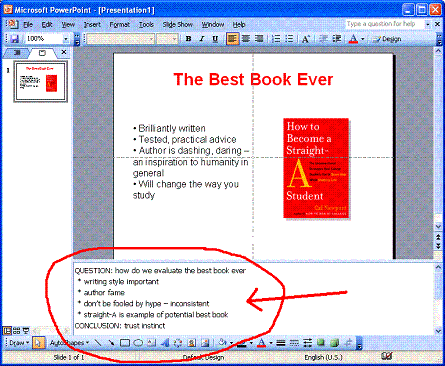
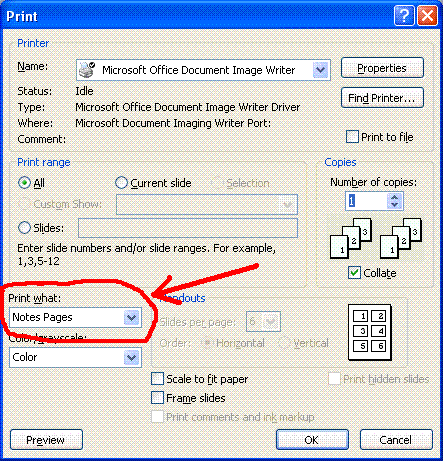
When the class is over, you can then print out your slides in notes view — which will show, on each page, the slide along with the notes you recorded. The notes view can be selected from the print menu as shown below:
If You Don’t Have the Slides in Advance, Mark the Page Numbers
Sometimes the professor makes the slides available only after the lecture. In this case, take notes in a word processor on your laptop as usual. This time, however, whenever the professor changes the slides mark the new page number in your notes.
Later, when you get your hands on the slide files, load them up in Power Point. Use the page numbers in your notes to copy and paste the text right into Power Point in the notes window under the appropriate slides. You can now print out the two together in notes view as before.
Studying Power Point Slides
The alert reader will remark that some professors use a huge number of slides. The thought of having to review every single slide presented during the semester is enough to drive many to despair. In this case, you might considering cleaning up your notes in Power Point before printing them for review. Even after you’ve done some cleaning, it’s still not obvious how best to study from this material. Here are some tips to help you out:
- Throw Out Unnecessary Slides. Some slides don’t really add much to the content of lecture — maybe they represent a minor tweak on a different slide, a digression, or some administrative details — erase these from the slide show file. The less slides you print, the quicker you’ll be able to study later on.
- Consolidate notes for sequences of slides. If a several slides in a row expand on the same basic point, consolidate your notes onto the first of these slides. This reduces the number of pages of notes you have to review even if you can’t throw out all the slides.
- Study by Replicating the Lecture. Print the slides in notes view. Go through the printouts one by one. For each page, start by covering over the notes section so you can’t cheat. Try to lecture, as if talking to an imaginary class, about what’s important about the slides. Check the notes to see if you hit the high points. If not, mark it to return to in the next pass (this is classic Quiz-and-Recall studying.)
Conclusion
Think of Power Point slides as a handy visual aid to augment your studying. They might make the lectures stilted, but having slides printed along with your notes will make your life easier when it comes time to review.

Wait! What about the good’ol’fashioned pen? You know, with ink and stuff.
Because writing clearly allow you to anchor (I’m not quite sure of the word in english…) ideas… Its a basis of psychomotricity, and there are a lot of other applications… It’s obviously better to write down stuff (even if it is in the margin of the printed slides) on your own, not on a computer. Trust me.
Even if i have a deep relationship with my laptop, he never ever shown up in any conference, seminar, or lecture I’ve been invited to (well… maybe one or twice, but it was only because I was the speaker…).
Alas, I must disagree. As readers of Straight-A know, I’m a big proponent of taking notes on your laptop. There are three reasons:
(1) You type much faster than you can write
(2) You type neater than you can write
(3) It is much easier to deal with computer files when it comes time to reorganize and print this information into study guides
Interestingly now we have the option of using OneNote on touchpad laptops. I take notes directly onto my powerpoint slides with a stylus pen. I write fast enough for my science courses that really require just a few annotations on diagrams to understand the point, and I get the advantage of “writing to remember” while keeping everything digital and easy to organize. Amazing how times have changed since you wrote this blog post!
I agree as well with Cal’s points on why taking notes on laptop is better. Personally it is much easier to follow along with the professor since I personally can type faster than I can write, and I can always organize them better (even during class, this really saves up a lot of time later on!!!) than I can while writing it down.
Unfortunately, I have profs who won’t allow laptops in class. Drives me nutsy, as I type much faster than I write longhand, and my handwriting is typically illegible.
Techgirl,
Laptop bans are increasingly common. It’s our own damn fault, because of all the web-surfing we do! There have been classes where I’ve actually type up my notes at the end of each week to simplify studying later. It really helped. But it was hard to consistently motivate myself to do.
– Cal
I just read this post and I think it’s a great idea. However, most of my teacher send us slides in pdf format. So doing this is pretty much complicated.
Maybe adobe could do it but i’m on linux. If anyone here finds a lightweight open-source program to do what is said on this blog please tell me !
I don’t do this because I can’t find any way to print just the notes from the slides. Printing the slides with notes prints an entire page per slide, and many of my lectures have 60+ slides per lecture…it would waste a tone of paper. I have a Mac. Anyone know how to consolidate with notes? Right now I print out the slides three per page with the lines next to them and take notes longhand, but if I could type in that area it would VASTLY improve my life!
Megen:
Great question. I don’t know the answer, but would be really interested to hear if someone did. For some lectures with many notes I used to just cull out the non-essential before printing.
– Cal
This is a response to Cal and Megan. I use Microsoft OneNote to take notes (for those who aren’t familiar with this superb note-taking program, check out https://office.microsoft.com/en-us/onenote/default.aspx). In any program that allows you to print, like Powerpoint, select the printer name “Send to OneNote 2007.” Your slides will pop up in OneNote and you can send them to anywhere in OneNote. You can conveniently take notes right by the slides and change the slide size so you don’t kill your printer. For example, you can have 5 slides in a column with your notes typed on the side. Use page setup to make sure your content prints within 8.5 by 11 inches.
This comment doesn’t relate to the topic at hand, Cal. But could you write an entry about how you would handle professors with foreign accents? And I mean professors whose accents are about impossible to understand — like you look at your notes and they don’t make sense. And after seeking professors who teach the same class, but who have foreign accents as well, what would you do?
@Vincent
Thanks for the tip on OneNote. For students who have the software, sounds like a good way to deal with power point.
In terms of the foreign accent issue — which I’m lucky to have faced only once, surprisingly enough, taking CS courses at three different universities — I think emphasis needs to be turned to the recitation sections, which become like your main lecture. I’ll think about if I have enough advice here for a full post. Thanks for the idea!
Hey Cal, bought your book, read parts of it (short on time before semester), and really enjoyed it. Quick question though, I am taking a business course and the prof prints out the powerpoint slides for us, with no room to write notes (except small margins). However, she also does put them online, but I am in no way able to obtain a laptop to take notes during class.
What is my best option?
@Stefan:
You might try printing the files in advance using the notes page view as described above. Because you haven’t taken notes yet, this should just leave a blank half page under each slide. You can then take notes in this space (and on the back) during the lecture.
Another approach is to use some special notation in your notebook to indicate what slide number in the presentation you are taking notes on. (i.e., “P9” for slide number 9). I used to do something similar back before the era of laptops dawned upon us.
The way I’ve dealt with just printing notes from slideshows (using Office 2007) is to go to the orange button in your top left hand side (idk what they call that thing?) and go to Publish>Create Handouts in Microsoft Word>Notes Next to Slide. It will send everything to word. Then I delete the columns containing the slide pictures and slide number and clean up what’s left. It’s a pain… but when it saves you precious printer ink, paper, and time… it’s worth it!
My classes are basically math classes (i’m too lazy to explain it all again) so I guess I have to study with a laptop and a notebook open.
Old school technique for anyone who can’t use a laptop: From the syllabus you know what chapters are being covered. Bring the book(s). If the book allows write your notes in the margin or write in a notebook. If writing in a notebook make sure to note the textbook page the lecture is clarifying or adding to. When you get your powerpoint information, add your notes from class then. Remember, your notes should be short hand and need only help to spark your memory for when you fill in the details around the PowerPoint notes. For anyone with bad handwriting – practice and improve.
This is what i do at medschool, where EVERYTHING is powerpoint… one thing that you can do to slim down the amount of paper that you use is to use the “layout” feature when ur printing to put multiple notes pages on a single printed page; also, you can remove the slide all together when in the “master notes” mode of powerpoint
I find it hard to stay awake in classes, even when I’m taking notes. This often occurs in lectures with lecturers with foreign accents (large number of these), or lecturers who give very disorganized lectures. Thankfully, my lectures are often webcasted. Interestingly, I can actually stay awake when I listen to these at my own pleasure. Any recommendations? (I’m a CS major too)
How about when professors post power point slides in pdf form? Such that you can only open them as pdf’s. Typically, students print the slides out, 4 per page, and then fill in extra information during class. The professors who do this also don’t post complete slides, with information blanks on the actual slides.
Any ideas?
For professors who post powerpoint slides in pdf form, try out “Okular.” It’s a free universal document viewer that works on multiple platforms. When you open a pdf file, press f6 or go to Tools->Review a small panel should pop up. At the very top of this panel, when you hover your mouse over it, is called Note[1]. Click it and it should say “Text Annotation” at the top, now click anywhere on the pdf file to add a tiny icon. Double-Click this and type in whatever you want.
I usually print the slides and use the Morse Code method…of course, I also rarely take notes.
Okay so I have been thinking about this for some time. How could I take my chemistry notes on my laptop. There are so many math problems and Greek symbols that I think it would be hard to keep up if at all possible. Is there an easier way?
This is probably a bit late for you, Ben, but what I used to do when short on time in math lectures and typing my notes is type out the names of greek symbols and symbols which don’t have a keyboard shortcut and do the rest in calculator style (like / for divide, * for multiplication and brackets as needed). Afterwards or in a slower part of the lecture you can edit them to a more elegant format. For Microsoft word 2010 you get an equation editor which can allow you to typeset equations. If you have an earlier version, you can instead use a program called LyX. It’s free, compatible with all three common operating systems and allows you to typeset equations easily. It’s a version of LaTeX but you don’t need to remember commands and stuff like that.
Isn’t there Science saying that you learn better writing your notes out? I do see your points though that typing is much more organized, quicker and etc.
I study from the powerpoint lectures on my computer. Is there a way to “bookmark” or “flag” a specific slide that covers something important?
While this may work for some people, it doesn’t work for everyone because people have different preferences for learning. Some people like hard cover books while others prefer ebooks. I don’t think that laptops give a significant advantage to those who don’t use them for class. Personally writing things down helps me remember better so I just print my slides so I can write and highlight freely. I print about 6 slides on a page if it’s legible and write/draw on the back or on the slide if there’s enough space.
Have you noticed that this article was written in 2007, yet at the time of this writing (2015), we still have some difficulties with PowerPoint? Thank you everyone for sharing insight on how to deal with PowerPoint and notetaking!
Hi Cal,
I think that this post would be perfect for an update. I’m looking for a tablet or touchscreen laptop with a digitizer pen for this fall when I start veterinary school – I want to update from my undergrad method (print/annotate and rewrite as a study guide). Are there any tricks for reading so much from a computer screen? I try to get important textbooks in print to reduce fatigue. Thanks!
CB
I strongly believe laptops can be invaluable when used CORRECTLY for studying. I tend to prefer taking hand written notes as I like to scrawl lead on’s and even pictures sometimes. In lectures I attend however, there are always several students tapping away recording what the lecturer is saying VERBATIM. I don’t see how that is actively learning or retaining information. It was so bad lecturers were taking time up in lectures to explain to us that mindlessly recording every word said does not work. The typing of keys is so loud it echoes in the theater. Other times I look accross or down at people with laptops and I see facebook or tetris or random web surfing – not only distracting but rude and a waste of academic fees!
Computers are v stressful. dont get addicted! u won’t find the outcome funny
this looks cool
Thank you Mr. Cal , this is useful for me.